

Akamai Cloud Object Storage is an S3-compatible service and, as such, it allows applications to talk “S3” using the Ceph Object Gateway S3 API. This means compatibility with a large subset of the Amazon S3 REST API.
The API is divided into three groups, which go into a lower level each:
- Service operations
- Bucket operations
- Object operations
Working with the API
The steps for interacting with the API using your preferred REST client may vary. Here, I’ll describe how to do it using Postman.
We’ll use AWS Signature to authenticate our REST requests, which requires an access key with permissions to interact with the clusters you choose.
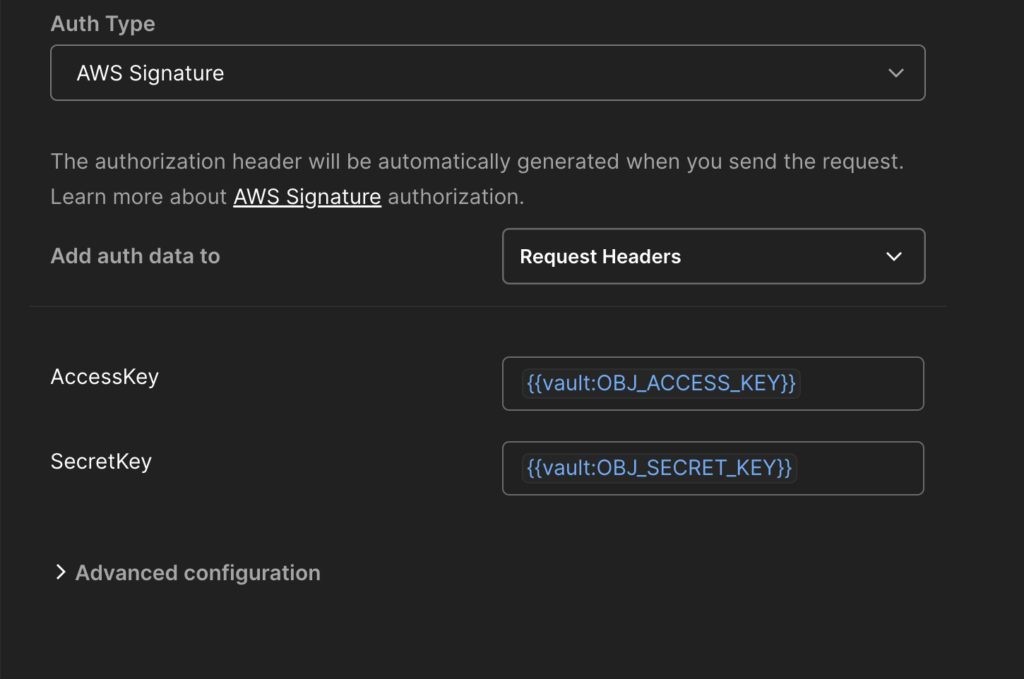
Next, from the “Supported endpoint types by region” section, take the S3 hostname value that matches your selection; it’s in the format {{objcluster}}.linodeobjects.com, where {{objcluster} is something like us-lax-1 or fr-par-13. You’ll be using something like this as the base URL for the endpoint.
https://{{objcluster}}.linodeobjects.com
Now, here’s the list of operations you can execute against Akamai Cloud OBJ, with links to their specific docs for more information.
| Category | Operation | Syntax | Documentation |
| Service | List Buckets | GET / | https://docs.ceph.com/en/latest/radosgw/s3/serviceops/#list-buckets |
| Bucket | Create Bucket | PUT /{bucket} | https://docs.ceph.com/en/latest/radosgw/s3/bucketops/#put-bucket |
| Bucket | Delete Bucket | DELETE /{bucket} | https://docs.ceph.com/en/latest/radosgw/s3/bucketops/#delete-bucket |
| Bucket | List Bucket Objects | GET /{bucket} | https://docs.ceph.com/en/latest/radosgw/s3/bucketops/#get-bucket |
| Bucket | Get Bucket Location | GET /{bucket}?location | https://docs.ceph.com/en/latest/radosgw/s3/bucketops/#get-bucket-location |
| Bucket | Get Bucket ACL | GET /{bucket}?acl | https://docs.ceph.com/en/latest/radosgw/s3/bucketops/#get-bucket-acl |
| Bucket | PUT Bucket ACL | PUT /{bucket}?acl | https://docs.ceph.com/en/latest/radosgw/s3/bucketops/#put-bucket-acl |
| Bucket | List Bucket Multipart Uploads | GET /{bucket}?uploads | https://docs.ceph.com/en/latest/radosgw/s3/bucketops/#list-bucket-multipart-uploads |
| Bucket | Toggle Bucket Versioning | PUT /{bucket}?versioning | https://docs.ceph.com/en/latest/radosgw/s3/bucketops/#enablesuspend-bucket-versioning |
| Bucket | Place Object Lock | PUT /{bucket}?object-lock | https://docs.ceph.com/en/latest/radosgw/s3/bucketops/#put-bucket-object-lock |
| Bucket | Get Object Lock | GET /{bucket}?object-lock | https://docs.ceph.com/en/latest/radosgw/s3/bucketops/#get-bucket-object-lock |
| Object | Upload Object | PUT /{bucket}/{object} | https://docs.ceph.com/en/latest/radosgw/s3/objectops/#put-object |
| Object | Copy Object | PUT /{dest-bucket}/{dest-object} | https://docs.ceph.com/en/latest/radosgw/s3/objectops/#copy-object |
| Object | Remove Object | DELETE /{bucket}/{object} | https://docs.ceph.com/en/latest/radosgw/s3/objectops/#remove-object |
| Object | Get Object | GET /{bucket}/{object} | https://docs.ceph.com/en/latest/radosgw/s3/objectops/#get-object |
| Object | Get Object Info | HEAD /{bucket}/{object} | https://docs.ceph.com/en/latest/radosgw/s3/objectops/#get-object-info |
| Object | Get Object ACL | GET /{bucket}/{object}?acl | https://docs.ceph.com/en/latest/radosgw/s3/objectops/#get-object-acl |
| Object | Set Object ACL | PUT /{bucket}/{object}?acl | https://docs.ceph.com/en/latest/radosgw/s3/objectops/#set-object-acl |
| Object | Initiate Multi-part Upload | POST /{bucket}/{object}?uploads | https://docs.ceph.com/en/latest/radosgw/s3/objectops/#initiate-multi-part-upload |
| Object | Multipart Upload Part | PUT /{bucket}/{object}?partNumber=&uploadId= | https://docs.ceph.com/en/latest/radosgw/s3/objectops/#multipart-upload-part |
| Object | List Multipart Upload Parts | GET /{bucket}/{object}?uploadId= | https://docs.ceph.com/en/latest/radosgw/s3/objectops/#list-multipart-upload-parts |
| Object | Complete Multipart Upload | POST /{bucket}/{object}?uploadId= | https://docs.ceph.com/en/latest/radosgw/s3/objectops/#complete-multipart-upload |
| Object | Abort Multipart Upload | DELETE /{bucket}/{object}?uploadId= | https://docs.ceph.com/en/latest/radosgw/s3/objectops/#abort-multipart-upload |
| Object | Append Object | PUT /{bucket}/{object}?append&position= | https://docs.ceph.com/en/latest/radosgw/s3/objectops/#append-object |
| Object | Put Object Retention | PUT /{bucket}/{object}?retention&versionId= | https://docs.ceph.com/en/latest/radosgw/s3/objectops/#put-object-retention |
| Object | Get Object Retention | GET /{bucket}/{object}?retention&versionId= | https://docs.ceph.com/en/latest/radosgw/s3/objectops/#get-object-retention |
| Object | Put Object Legal Hold | PUT /{bucket}/{object}?legal-hold&versionId= | https://docs.ceph.com/en/latest/radosgw/s3/objectops/#put-object-legal-hold |
| Object | Get Object Legal Hold | GET /{bucket}/{object}?legal-hold&versionId= | https://docs.ceph.com/en/latest/radosgw/s3/objectops/#get-object-legal-hold |
As you can see, this list includes the (large) subset of operations compatible with Akamai Cloud Object Storage, plus a few that are specific to AWS S3 and aren’t supported. Keep in mind that there are also differences in E0/E1 and E2/E3 endpoints; for example, object-level ACLs are only supported on the former.
Final remarks
S3 compatibility means the client can speak “S3” with the API, but caveats apply to multiple operations. It’s important to validate each scenario to determine whether it’s fully compatible or needs adjustments, but this description can help with much of the initial heavy lifting when interacting with Object Storage via Ceph Object Gateway.
Have fun!
Leave a Reply